SaaS Authentication: What You Need to Build (and What You Can Skip)
Every SaaS needs authentication, and almost every developer underestimates what "authentication" actually includes. A login form is ten percent of the work. The rest is the flows, edge cases, and security layers that have to exist before real users can trust your product with an account.
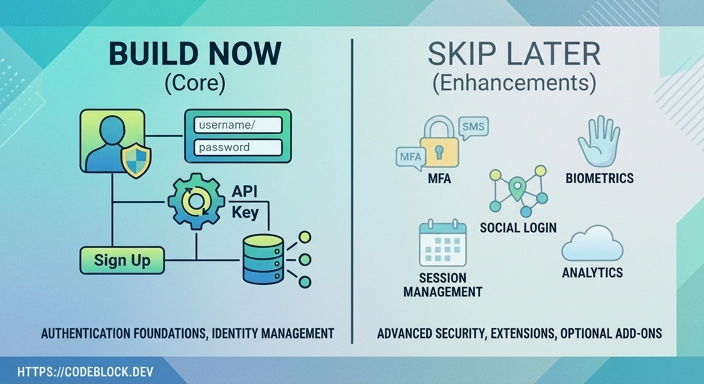 This article covers what SaaS authentication actually requires, what you can defer without consequence, and where the common shortcuts become expensive problems.
What You Must Build Before Launch
Registration and Login
The happy path is obvious: user enters email and password, account gets created, user gets in. What makes this production-quality is handling everything around the happy path:
- Duplicate email detection with a clear, non-confusing error message
- Password strength requirements communicated at the form level, not after submission
- Throttling or rate limiting on registration to prevent bot signups
- HTTPS enforced across all auth endpoints (not optional, ever)
Login needs the same treatment: clear error messages that don't confirm whether the email exists (to prevent account enumeration), and a lockout mechanism after repeated failed attempts.
Email Verification
Users who register but never verify their email create a category of account management problems: password reset requests sent to addresses the user doesn't control, duplicate accounts from typos, and spam registration. Email verification before granting full access is not optional for a production SaaS.
What to build:
- A verification link sent to the email at registration
- A reasonable expiry on the link (24-48 hours)
- The ability to resend the verification email
- A grace period for unverified accounts (let them poke around, but gate billing-required features)
Password Reset
Users forget passwords. The reset flow needs to work, which means the email delivers reliably, the reset link expires correctly, and the new password takes effect immediately after the reset. Testing this end to end - including the email delivery - before launch is mandatory. Password reset failures are the most common auth support request in the first week after launch.
Session Management
For web SaaS applications using ASP.NET Core, the session management choice is usually between cookie-based auth and JWT tokens. Cookies with HttpOnly and Secure flags are the correct choice for browser sessions: they're not accessible to JavaScript and they're sent automatically. JWT tokens are better suited for API clients and mobile apps.
Whatever you choose, handle these cases explicitly:
- Session expiry: how long before the user is asked to log in again?
- Explicit logout: the session is invalidated server-side, not just the cookie is cleared
- Concurrent sessions: can a user be logged in from multiple devices? Should they be?
CSRF Protection
For cookie-based web apps, Cross-Site Request Forgery (CSRF) protection is required on any state-changing endpoint. ASP.NET Core provides this via anti-forgery tokens. It's on by default for Razor Pages and Blazor Server but needs explicit attention in API endpoints that also accept browser cookies.
What You Should Build Early
Two-Factor Authentication (2FA)
Two-factor authentication is not a launch requirement for a consumer SaaS - but it should arrive in the first major update after launch, not months later. The cost of retrofitting 2FA into an auth system that wasn't designed for it is higher than adding it while the auth code is fresh.
The most common 2FA implementation is TOTP (Time-based One-Time Password): the user links an authenticator app (Google Authenticator, Authy) and provides a six-digit code at login. This is what "two factor auth saas" searchers are usually looking for when evaluating a product's security posture.
Backup codes are part of this: if the user loses access to their authenticator app, they need a way back in that doesn't involve calling support.
OTP (One-Time Password) via Email or SMS
Some products use email or SMS OTP as an alternative to passwords (magic links or verification codes), or as a second factor. For B2B products where users are employees, OTP via SMS is often preferred over TOTP apps because it doesn't require installing another app.
If you're adding SMS OTP, the implementation involves a third-party service (Twilio, Vonage, AWS SNS) and rate limiting to prevent SMS pumping - a real abuse vector where attackers trigger large volumes of SMS sends to rack up charges.
Social Login
OAuth-based social login (Google, Microsoft, GitHub) is expected in SaaS products today. Users who can sign in with an existing account skip the password step entirely, which reduces friction at registration.
The complexity is in edge cases: what happens if a user registers with email, then tries to log in with Google using the same address? What if they registered with Google and now want to set a password? Your auth system needs a clear policy for linking accounts and a UI that communicates it.
What You Can Skip at First
SSO with enterprise identity providers. SAML-based or OpenID Connect SSO with customers' Active Directory or Okta is an enterprise feature. It's important eventually for B2B products, but the complexity of implementing it correctly is substantial. Most early SaaS products close their first enterprise deals without it, then add it during the sales process for a specific customer. Build it when a customer requires it, not speculatively.
Risk-based authentication. Flagging logins from new devices or unusual locations, then requiring additional verification, is a good security layer. It's also a customer support generator if the detection logic is too aggressive. This is a feature for a product that has users and a support team, not a launch requirement.
Passkeys. Passkeys (WebAuthn-based passwordless auth) are the direction the industry is heading, but the library support and user familiarity vary enough in 2026 that treating this as a later addition is reasonable. Standard TOTP-based 2FA covers the security requirements for most SaaS products today.
The Identity System Behind This
In ASP.NET Core, the authentication foundation is ASP.NET Core Identity, combined with EF Core for user storage and the built-in authentication middleware for session handling. The Identity library handles password hashing, claim management, and basic user storage. The flows around it - email verification, 2FA, social login, OTP - are implemented on top.
Getting this right from the start is significantly easier than retrofitting it. Auth is one of the layers that touches almost every other layer: billing (who has an active subscription), admin (who is an administrator), and feature access (what can this user do).
For why the auth foundation connects to everything else in a SaaS product, SaaS Foundations: The Hidden Work Behind a Real Product explains how each layer depends on the ones below it.
CodeBlock DevKit and Identity
For .NET developers, CodeBlock DevKit includes a complete identity module: registration, login, email verification, password reset, TOTP-based 2FA, social login, and role management. It's built on ASP.NET Core Identity with the flows fully implemented, so the work covered in this article is done before you write any product-specific code.
This matters especially because auth flows need to work correctly under real load, with real email delivery, before launch. Getting this from a production-tested module rather than building it fresh every time is where the foundation investment pays back. For the next layer after auth, SaaS Subscription Management: What You Need to Build covers the billing lifecycle in the same level of detail.