ASP.NET SaaS: How to Structure a Production-Ready Application
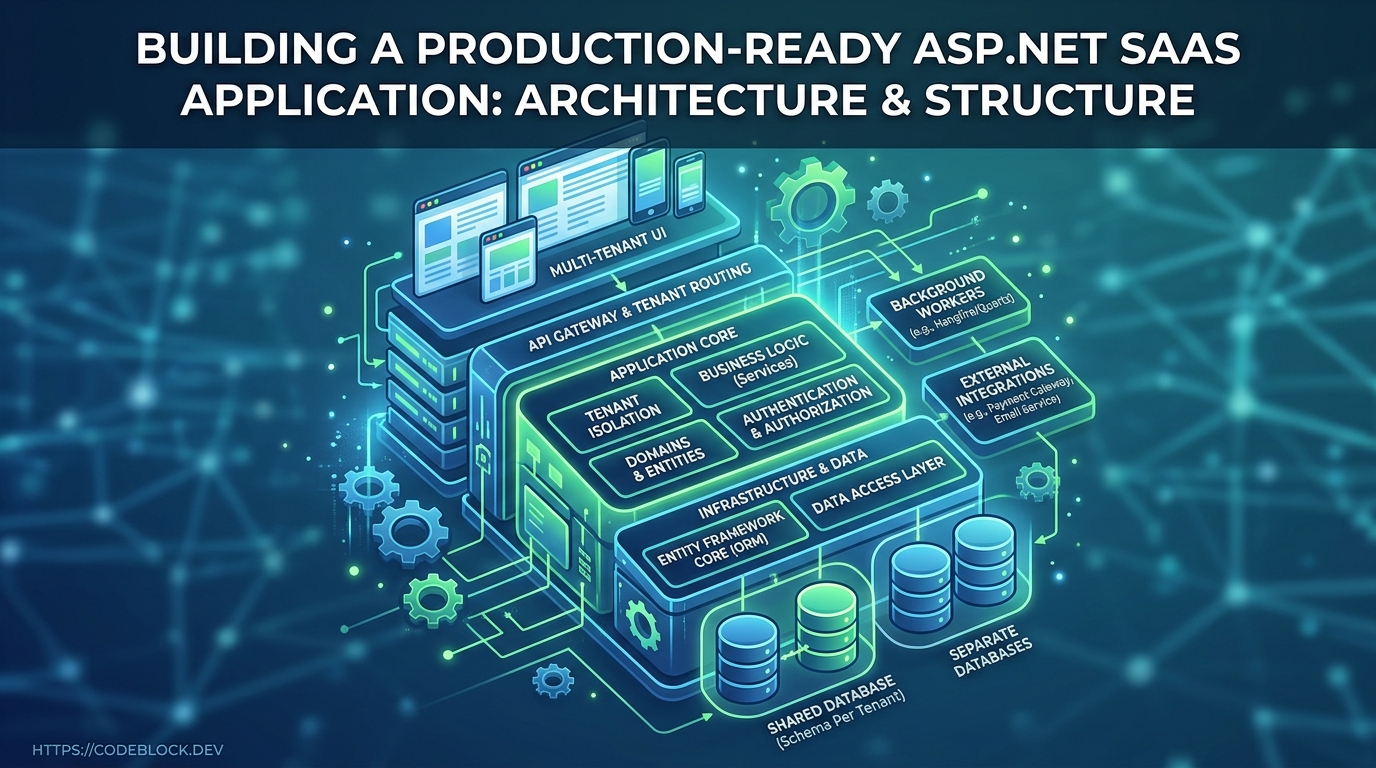
Building a scalable SaaS on ASP.NET isn’t just about writing endpoints—it's about future-proofing your business and making sure tech never holds you back. Here’s a guide for 2026 on structuring SaaS in .NET Core so you launch fast, migrate easily, and never get stuck in “rewrite hell.”
Why ASP.NET for SaaS in 2026?
- Mature ecosystem: Deep NuGet libraries, templates, DevKit modules, and documentation
- Performance: One of the best for C#/WebAssembly/real-time APIs at scale (Blazor for fullstack/cross-platform UI)
- Enterprise and startup ready: Battle-tested by banks, unicorn SaaS, and indie hackers alike
- Hire-ability: Talent pool and in-demand skills for long-term growth
Clean Architecture Patterns: Layered, Modular, and Beyond
- Layered (n-tier): Data Access → Domain Logic → API/UI. Pro: testability, clear code. Con: risk of "anemic domain."
- Modular/vertical slice: Build "features" as independent modules: Identity, Billing, Tenant, Admin, Notifications, Analytics. Each has API controllers, logic, Views, tests. Makes swapping, evolving, or rebuilding a module easy.
- Dependency injection: Throughout, inject not just repositories/services, but things like logging, event bus, pricing calculators, and 3rd-party integrations. Patterns: constructor injection, options pattern for settings, named/Keyed DI for multi-tenancy or plugin systems.
- Advanced: Consider hexagonal (Ports & Adapters) or CQRS for high-scale SaaS, separating commands from queries for optimization.
- Sample project layout:
/Src
  /Modules
    /Identity
    /Billing
    /Admin
    /Notifications
  /Shared
  /API
  /Web (Blazor/MVC)
  /Jobs (background workers)
Absolutely Essential SaaS Modules (Not Just CRUD)
- Identity/Auth: User registration, login, 2FA, password reset, multi-tenant & SSO support
- Billing: Subscription management, plan changes, trial/upgrade/cancel flows, Stripe/Paddle/your provider
- Admin: User management, feature flags, usage & billing dashboards, support interventions
- Notification: Email/SMS/push, notification logs, admin alerts
- Monitoring & logs: Centralized structured logging (Serilog, Seq, ELK), error tracking, insights dashboard
- Multi-tenant isolation: Strict boundary lines—every API call, job, report validates tenant context (row or schema separation recommended for most SaaS)
- Health checks: Actively probe dependencies (db/cache/3rd party) and alert before users notice
Configuration, Environments, and Secure Secrets
- Use
appsettings.Development.json,appsettings.Staging.json, and user secrets (dotnet user-secrets for local dev) - Store connection strings, keys, sensitive values in Azure/Cloud secret stores—not in source or CI logs
- Build-time env switches for logging, analytics, and error reporting enable safe deploys
CI/CD, Deployment, and Migrations
- Automate build, test, and deploy (GitHub Actions, Azure DevOps, TeamCity, BitBucket):
- Unit + integration tests on PR
- Build artifacts versioned & published
- Automated DB migrations (EF Core migrations, audit logs on schema change)
- Canary or blue/green deploys for zero-downtime
- Robust rollback plans (always test rollbacks in staging)
- Staging environments match prod as much as possible for finding config issues before shipping
Monitoring, Recovery, and Growth
- Instrument with real-time monitors (health endpoints, log aggregation, error trackers)
- Add audit logging for every user/action: who did what, when, and results (for B2B compliance)
- Alert instantly on job/queue failures, payment provider or email downtime
- Growth: Add analytic hooks, feature flags, allow non-breaking module extension (API-first, contracts stable)
Common Pitfalls (and How to Avoid Them)
- Ship a new module: keep it modular, test in isolation, don’t tangle code with legacy
- "It works on dev but fails prod": always use staging, unique database per environment, and seed scripts
- Ignore secrets/config for speed—leads to leaks and security fires later
- CLI-only migrations: always automate, test, and document
- Neglecting tenant boundaries: never trust client POST data to set context—verify server-side every request/action
Where CodeBlock DevKit Excels
CodeBlock DevKit gives you:
- Fully wired architecture: Identity, Billing, Monitoring, Notifications, Admin ready for prod
- Templates for sharp module separation + quickstart CI/CD setup
- Pre-built health checks, config/environment patterns, logging, multitenancy support
- Staging/prod best practices, all upgradable across releases
- Full code/feature docs at docs.codeblock.dev
Launch Checklist: Production-Ready ASP.NET SaaS
- Modules for identity/billing/admin/notifications/monitoring
- Separate config for each environment, with prod secrets in secure stores
- CI/CD workflow with test, build, migration, and rollback
- Tenant enforcement and isolation tested
- All endpoints, jobs, and reports audit-logged
- Real-time monitoring and error alerting set up
- Admin and user-facing health/status pages
- Complete staging system, matching prod
- All code versioned, templated, and documented for team/onboarding